The Table
The Table is where most task work actually happens — and it isn’t only tasks. Every file in your vault is a row: tasks, notes, canvases, whiteboards, Paper drawings, PDFs, ebooks, images, recordings. You decide which columns, which rows, and in what order.
The toolbar
Section titled “The toolbar”Across the top, left to right:
- Saved filter pills — one click to apply a view you set up earlier. See Filters and saved views.
- Quick add — type a title, press Enter, done. The dropdown beside it picks whether you’re making a task or a note.
- Search titles — narrows to matching titles, on top of whatever filter is active.
- Kinds — which kinds of file appear as rows. It sits beside Filter because it is the other thing deciding what you see.
- Filter — the condition builder.
- Sort — up to three levels; the button shows how many are in force.
- Grouping — break the table into sections.
- Hierarchy — show subtasks nested under their parents, or flatten everything.
- Columns — choose which columns show.
- Table · Grid · Timeline — the layout switcher; see Layouts below.
- Embed — copies this view as a block you can paste into a note, where it keeps itself up to date. See Embedding a table in a note.
- Import — bring in tasks from elsewhere; see Importing tasks.
- New task — opens the full task dialog.
Import and New task both create files, so both are grayed out until you enter a license key — hover either one and the tooltip says why. Everything else in the toolbar works unlicensed.


Which files show
Section titled “Which files show”Images, video, audio and unrecognized files are hidden to begin with. A vault usually holds far more pasted screenshots than notes, and a table buried under them is no use. Everything else — tasks, notes, canvases, whiteboards, Paper, PDFs, ebooks, plain text — shows by default.
Open Kinds to change that. Each kind has a count beside it, so you can see what you’d be letting in. Three buttons at the bottom:
- Clear unticks everything. The fast way to “only PDFs” is to clear and tick one, rather than untick eleven.
- All ticks everything.
- Documents only puts the default back.
The button stays highlighted whenever some kind is hidden — including the default state, because it’s the only thing that can answer where did my screenshots go.
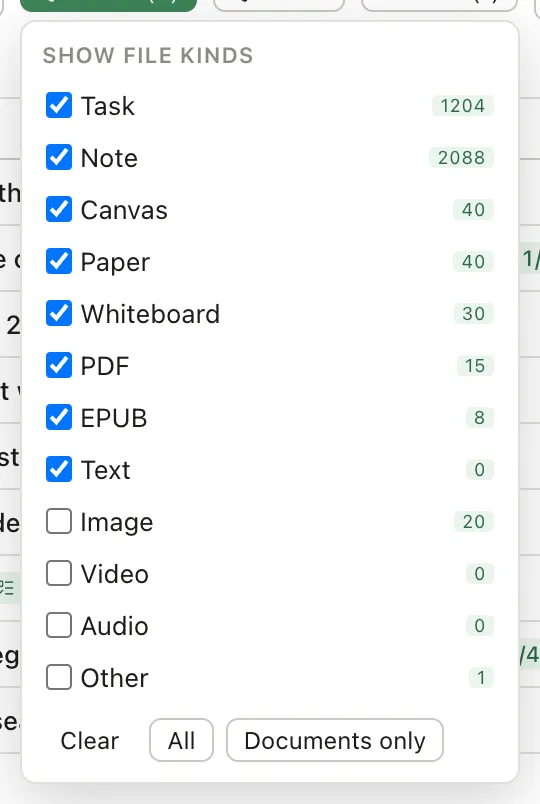
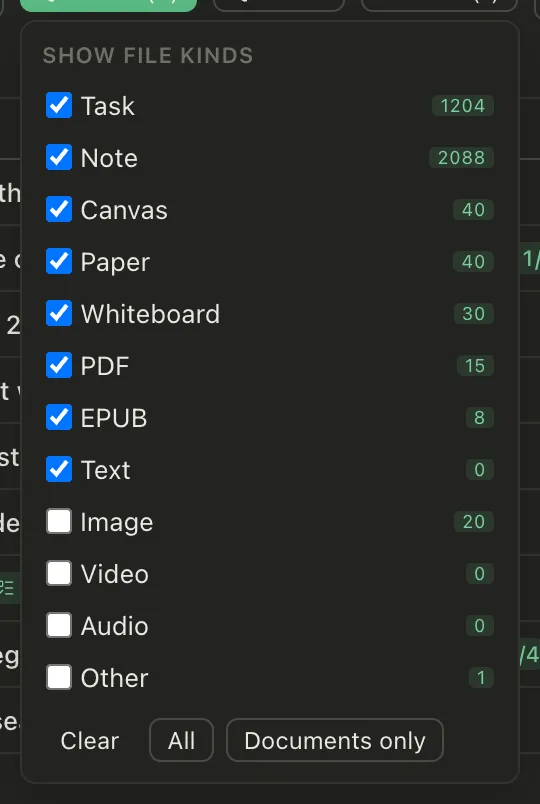
Clearing everything empties the table, and the table says so and offers the default back in one click.
Layouts
Section titled “Layouts”The switcher near the right of the toolbar draws the same rows three ways:
- Table — rows and columns, as described on this page.
- Grid — every file as a picture card: its banner or first image, else a preview. Each card lists the Table’s visible columns under its name, and the values edit in place just as they do in the table. A row under the toolbar sets the card size (S, M, L) and turns Covers on or off; Show images and video adds those files to the grid.
- Timeline — the table with the Timeline beside it. Its zoom, color and dependency controls sit in a row under the toolbar. Phones don’t offer it.
Saving a filter keeps its layout, so a filter saved from Grid or Timeline opens that way.
Editing without opening anything
Section titled “Editing without opening anything”Click a status cell and a menu lists every status, your own included — pick one. Click a priority cell and it cycles: none, low, medium, high. Group and tag cells edit in place too.
Click a Start or Due cell to set its date with a date picker, for tasks and for notes. A note’s date is written to its own scheduled or due property. You can also tick several rows and set a date from the selection bar. For anything more, open the task and you get the full editor with its body.
Subtasks
Section titled “Subtasks”A task can have a parent. With Hierarchy on, children sit indented under theirs, and a parent shows how far along its children are.
Turn hierarchy off when you want a flat list of everything due — a parent’s due date is often less interesting than its children’s.
Custom columns
Section titled “Custom columns”The built-in columns cover the fields every task has. Columns → Add custom column adds one for any other property in your vault — a client, an estimate, a review date. That works for any file, not just notes: a PDF can carry a Status and a Rating the same way a note can.
Start typing and it offers the properties you already use. Pick one and the column shows it, in the type that property already is. You can change that type, but the dialog warns you first: a property has one type across the whole vault, so changing it here changes it everywhere, and values that no longer fit show as invalid. Properties the table already shows, and the ones Pellet maintains for itself, aren’t offered — there’d be nothing to add.
Cells edit in place. What you type is written into the file itself where the format allows it, and kept alongside your vault where it doesn’t — see Properties.
Custom columns filter, sort and group like the built-in ones. The filter offers the values already in your vault as you type, so you don’t have to remember whether you wrote In review or in-review.
Remove column… takes the column out of the table, and the property and its values stay in your files. To delete the property as well, tick Also delete property from these notes before you confirm. It’s removed only from the notes the table is showing (its search, filter and kinds decide which), so a note the table hides keeps it. If file history is on, you can roll an edited note back from its history. A formula column stores nothing in your files, so it’s removed straight away.
Formula columns
Section titled “Formula columns”A formula column works out its value from the rest of the row: days until something is due, how much of a checklist is done, whether a task is overdue. In Add custom column, set the value type to Formula, then write one or start from an example. Nothing is written to your files. The result is worked out whenever the table shows it, so it is always current, and today() moves on at midnight on its own.
A formula reads a column with prop("Name"), using the name in the column’s header:
dateBetween(prop("Due"), today(), "days")Besides your own columns, a formula can read Title, Due, Start, Status, Priority, Tags, Group, Type, Created and Modified, plus a few things only Pellet knows: Checklist done and Checklist total, Subtasks done and Subtasks total, Duration, Archived, File name and Folder. It can also read another formula column.
The formula editor lists every property and function, with examples, and shows the result on a row you choose as you type. Any function can also be written after a value, so prop("Due").dateBetween(today(), "days") means the same thing. A few you’ll reach for often:
if(condition, then, else)andifs(condition, value, …, otherwise)to choose between valuesdateBetween,dateAdd,formatDateandtoday()for datesround,min,max,sumfor numberscontains,replace,lower,upperfor textmap,filterandjoinfor lists like Tags, wherecurrentis the item
When a formula can’t be worked out for a row, for example adding a number to a date, the cell says so and its tooltip explains what to write instead. The editor checks the formula against your rows, so it can point out a row it fails on even when the row you’re previewing is fine.
A number result can be shown as a Bar or a Ring instead (right-click the column header › Show as). These draw 0 to 1 as 0% to 100%, which suits prop("Checklist done") / prop("Checklist total"). Formula columns sort, filter and group like any other column. Renaming a column updates the formulas that read it.
Selecting several at once
Section titled “Selecting several at once”Tick the checkboxes and act on the lot: set a due date, change status or priority, move them to a group, delete them. Much faster than one at a time, and the usual way to clear a backlog that’s gone stale.
Very large vaults
Section titled “Very large vaults”The table only renders the rows you can see, so a vault with thousands of files scrolls at the same speed as one with twenty. Hiding a kind costs nothing either — hidden rows are never built.
The count
Section titled “The count”Top-left shows something like 2,519 of 2,984 — how many rows the current filter is showing out of everything. A useful sanity check when a filter is narrower than you meant.