Finding things
Transcript
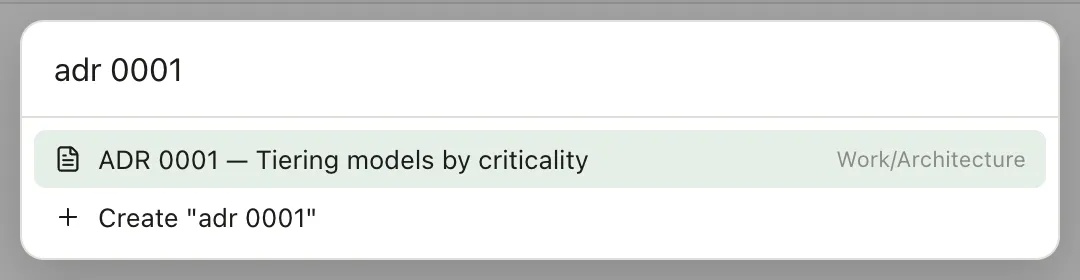
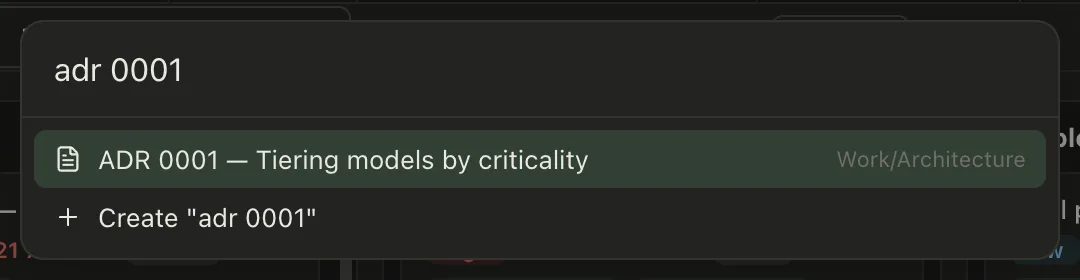
Jump to any note with command P. Start typing and Pellet narrows your whole vault as you go. Notes, tasks, canvases, anything. Press Enter to jump straight there. And if what you typed does not exist yet, the switcher offers to create it.
The quick switcher
Section titled “The quick switcher”⌘P. Start typing part of a note’s name and press Enter.
You don’t have to start at the beginning of the name — any run of letters that appears in it will do, so decis finds “Architecture decisions”. The letters do have to be together and in order; arcdec finds nothing. Names that start with what you typed sort first, then names that contain it, then notes matched on their folder path.
This is the fastest way to get anywhere and worth making a habit.
Before you type anything, the switcher lists your Favorites first, then the notes you changed most recently. Press Enter to open the first one.
If nothing matches, the switcher offers to create a note with what you typed. Thinking of a note that doesn’t exist yet and making it in the same keystroke is the point.
Search
Section titled “Search”The magnifying glass in the left rail searches the text inside your notes, not just their titles.
Results list the lines your words are on, under each file, with the line number and the word marked. Click a line and the note opens there with the word highlighted, so you can see it in the paragraph rather than hunting for it — no hunting for it a second time once the file is open. The file list steps aside while you’re searching, since the results already are the list.
The filter box above the note list does the same thing on whatever you’re looking at now, rather than the whole vault.
Narrowing a search
Section titled “Narrowing a search”Typing words still works the way it always has: every word has to appear somewhere. When that isn’t enough, the search box understands a little more.
Put "quotation marks" around something to match it exactly, as whole words: "cat" finds the word cat and skips cats and Applications, where an unquoted cat finds all three. Put OR between two things, in capitals, to accept either. Put a - in front of a word to leave out notes that mention it, and use brackets to group, as in meeting (work OR home).
You can also say which part of a note to look in:
file:planlooks at the filename,path:Work/Notesat the folders it sits intag:workfinds that tag and anything under it, likework/projectscontent:budgetlooks only inside the note, never at its titlematch-case:Planinsists on the capital letter[status]finds notes that have that property at all,[status:draft]matches what it’s set to
Anything else before a colon is treated as ordinary text, so searching for TODO: or a web address still finds it.
You don’t have to remember any of this. Click into an empty search box and it lists what you can narrow by. Type tag: and it offers your tags, path: your folders, [ the properties your notes carry — arrow keys to move, Enter to pick.
The same list remembers what you searched for before, so yesterday’s query is one click away. It’s kept separately for each vault and never leaves your machine, and there’s a button on the History heading to clear it.
Searching by meaning
Section titled “Searching by meaning”Beside Text there’s Semantic. Turn it on in Settings → AI & MCP and Pellet reads your notes for what they’re about, so searching “how I keep track of what I owe people” finds the note about debts even if it never uses those words.
By default it runs on your own machine: the model downloads once, the index is built locally, and nothing is sent anywhere. The first build takes a while on a large vault and then keeps itself up to date as you write.
If you’d rather not spend the local compute, the Provider row offers Ollama on your own server, or OpenAI or Google in the cloud — the cloud ones send your notes’ text away to be read, and reuse whichever API key you already set up for transcription. Changing provider or model rebuilds the index, since each one returns vectors of a different size.
It only lists what stands out. A search for something your vault never mentions comes back empty rather than showing the fifty least-unrelated notes, and a real search stops at the end of its answers. If you’d like to see more or less, Result filtering in the same settings card has Relaxed, Normal and Strict.
The same understanding drives Related notes in the File Info panel: the notes about the same things as this one, whether or not you ever linked them.
Jumping around
Section titled “Jumping around”| Shortcut | Does |
|---|---|
| ⌘P | Quick switcher |
| ⌘D | Today’s daily note |
| ⌘[ / ⌘] | Back and forward, per tab |
| ⌘1–8 | Jump to a tab |
Filtering the list
Section titled “Filtering the list”The note list has a filter box at the top that narrows what’s shown in the folder you’re looking at. Handy when you know roughly where something is but not what it’s called — and it reads inside the files too: name matches show instantly, body matches stream in a beat later, and the words on your canvases, whiteboards and papers count.
Under each matching note you get the lines your words are on, the same as in Search. The count at the end of a note’s date line, like 3 matches, folds those lines away or brings them back for that one note. Type #health to narrow to notes with that tag, including ones tagged only in their properties.
Inside the box, Aa makes the filter match upper and lower case exactly, so Plan no longer finds plan. The round × clears the box and leaves the cursor in it; Escape does the same.
The sliders button beside the box opens a few switches, and Pellet remembers them:
- Collapse results starts every note folded, showing just the note and its match count. Click a count to open that one note. Turning the switch off opens them all again.
- Show more context shows each matching line in full, plus the line before and after it.
- Explain search terms adds a sentence under the box saying how your words are read: each word, any
"quoted phrase", any#tag, and whether case matters. - Show tags puts each note’s tags under it, filter or not.
Under the box, the count says how many notes you’re looking at and, while you filter, how many match and on how many lines. The ⋯ beside it copies the results as file names or as [[links]], ready to paste into a note. The dropdown on the right sorts the list by date modified, date created or name, either way round, and offers Manual order in a folder you can arrange by hand.
The Search pane has the same box with Aa, the clear button, the count and the copy menu, and the first three switches. The Tags and Properties panes have Aa, the clear button and a count.
For tasks specifically, there’s a much more capable filter builder — see Filters and saved views.